
Add Prospects to Trakstar Hire
Overview
Not every potential candidate begins the hiring process by applying for an open position. Many organizations proactively source and engage prospective candidates before they formally express interest.
The Prospecting Workflow allows you to manage these candidates separately from your standard hiring workflow. Prospects can move through their own customized stages until they are ready to enter the hiring process.
Note: The Prospecting Workflow is available on Pro plans.
What Is the Prospecting Workflow?
The Prospecting Workflow provides a separate pipeline for candidates who are being sourced rather than actively applying for a position.
Using a dedicated prospecting workflow allows your team to:
- Track sourced candidates independently from applicants.
- Customize prospecting stages to match your recruiting process.
- Move candidates into the hiring workflow when they become active applicants.
- Keep sourcing activities organized within each opening.
Enable Prospecting for an Opening
Prospecting is configured separately for each opening.
To enable the Prospecting Workflow:
-
Go to Openings.

- Select the opening you want to configure.
-
Open the Candidate Sources tab.

-
Scroll to the Prospecting section and turn Prospecting on.

-
Configure the stages for your prospecting workflow.

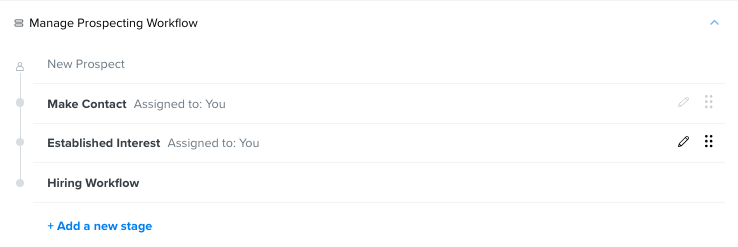
- Save your changes.


After prospecting is enabled, you can return to this page at any time by selecting Manage next to the Prospecting section to update the workflow.
Add Candidates to the Prospecting Workflow
After prospecting has been enabled for an opening, you can add candidates directly to the prospecting stages.

Candidates can be added through:
- Individual candidate upload.
- Bulk candidate upload.
- The Trakstar Hire Chrome extension.
When adding a candidate, select the appropriate prospecting stage instead of a standard hiring stage.
Move Candidates Between Workflows
When a prospect is ready to begin the hiring process, you can move them into the standard hiring workflow.

If needed, candidates who originally started in the Prospecting Workflow can also be moved back into a prospecting stage.
Move Prospects to a Decision Stage
Prospects do not have to enter the standard hiring workflow before reaching a final outcome.
You can move candidates directly from the Prospecting Workflow into one of your configured decision stages when appropriate.
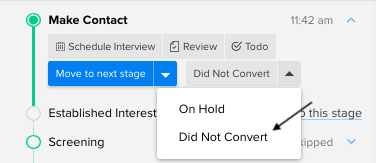
Important: Only candidates who originally entered through the Prospecting Workflow can be moved back into it. Candidates who begin in the standard hiring workflow cannot be moved into the Prospecting Workflow later.
Disable Prospecting
If you disable the Prospecting Workflow for an opening:
- New candidates can no longer be added to prospecting stages.
- Existing prospects remain in their current prospecting stages.
- Prospecting data is preserved.
Archived Openings
Candidates cannot be added to prospecting stages for archived openings.
To continue prospecting for a role, the opening must remain active.
View Prospect Candidates
Prospect candidates appear separately from standard applicants.
To view them:
- Open the Candidates dashboard.
-
Select the Prospects tab.


This view displays candidates currently progressing through the Prospecting Workflow.
Edit Decision Stages
Super Admins can customize the available decision stages used by the Prospecting Workflow.
To edit these stages:
- Go to Settings.
- Click Candidates Configuration.
-
Select Reasons for Candidate decision.
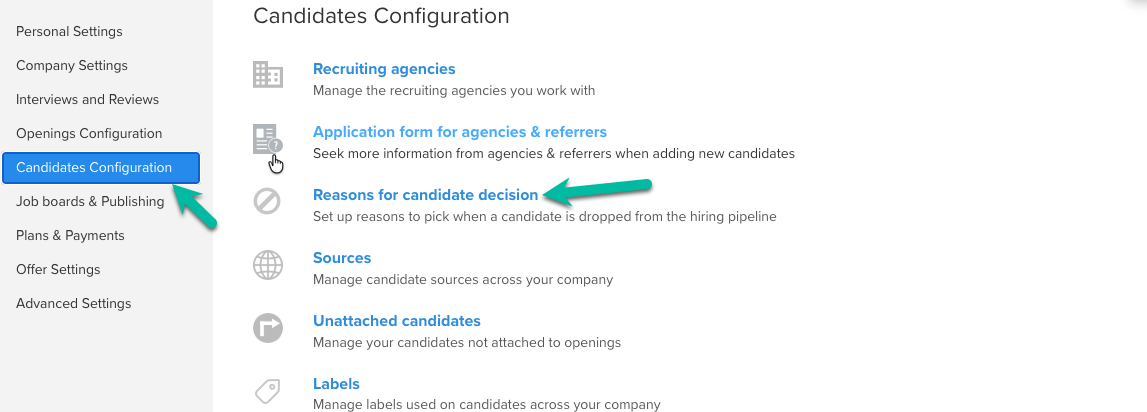
- Update the available decision stages as needed.
Best Practices
To make the most of the Prospecting Workflow:
- Enable prospecting only for openings that involve proactive sourcing.
- Create prospecting stages that reflect your sourcing process.
- Move candidates into the hiring workflow only after they express interest in the role.
- Periodically review the Prospects tab to keep sourced candidates moving through your pipeline.
Feel free to reach out at any time - hire@trakstar.com !