
Print a Candidate's Profile or Resume
Trakstar Hire allows you to print either a candidate's profile or resume, depending on what you need.
- Print Profile prints the candidate's profile information.
- Print Resume prints only the candidate's resume.
Note: Printing a candidate's profile does not include the candidate's resume. To print the resume, use the resume viewer's print option instead.
Print a Candidate's Profile
To print a candidate's profile:
-
From the left navigation menu, click Candidates.

-
Select the candidate whose profile you want to print.

-
In the upper-right corner of the candidate profile, click the More menu (three dots) then click Print this Page.

- Complete your browser's print dialog to print the profile.


Print a Candidate's Resume
To print only the candidate's resume, the steps are similar to printing a profile. Except once you're in the Candidate's profile:
- Scroll to the Resume viewer.
-
Click the Print icon in the upper-right corner of the resume viewer.
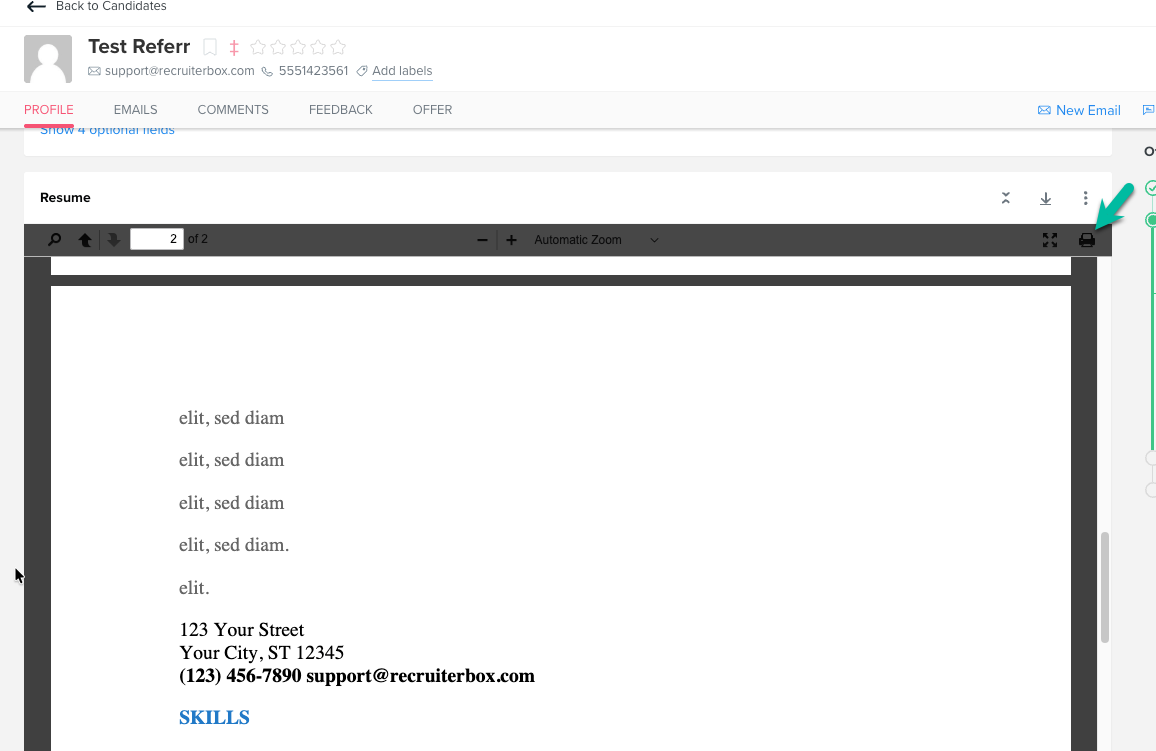
- Complete your browser's print dialog to print the resume.
Other Ways to Share Candidate Information
Printing is one way to share candidate information, but Trakstar Hire also provides collaboration features that allow colleagues to review candidates directly within the application.
Instead of printing, consider using:
- Send for Review to request feedback from colleagues.
- Interview features to share candidates with interviewers and hiring team members.
Download Candidate Data
If you need candidate information for reporting purposes, Account Super Admins can download candidate data by generating the Candidates Report.
Questions? Feel free to reach out at any time at hire@trakstar.com